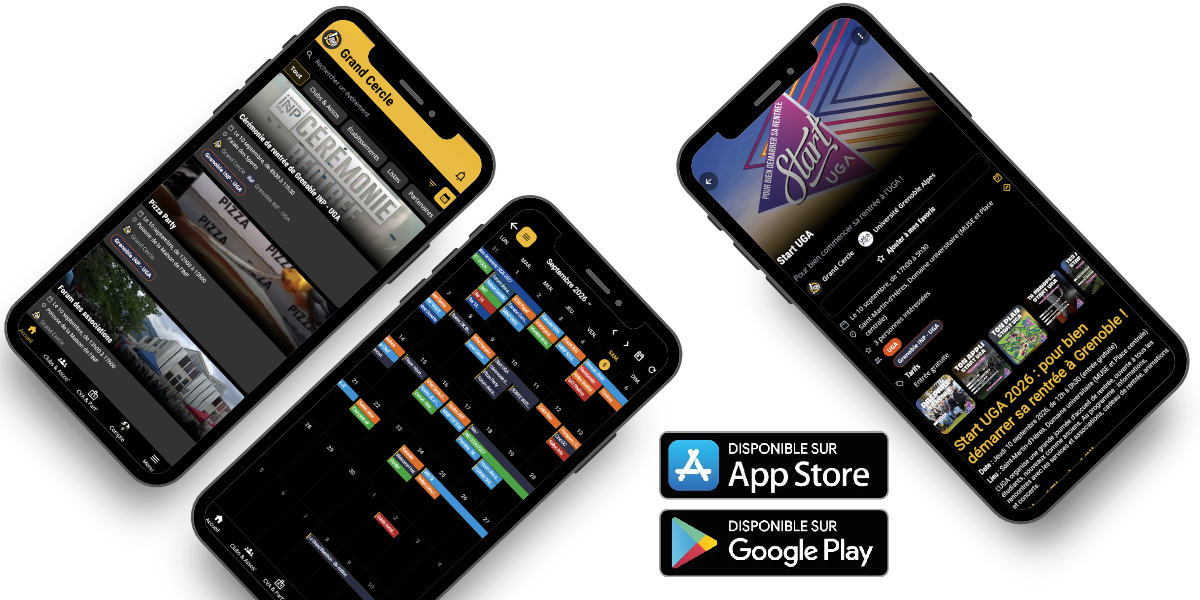
Ticketing, CVA card, shops, club directory, equipment booking, tournaments and notifications: everything the Grand Cercle app allows, and how to access it.
All student life at Grenoble INP – UGA is contained in a single app: events and ticketing, the CVA card and its partners, student association shops, the club directory, equipment booking, and notifications. Free, available on iPhone, Android, and via a web browser.

Events, ticketing, CVA, directories, notifications, association materials:
All the student life of the INP in your pocket.


Each box leads to the details of the function, further down this page.
Events and calendar
A timeline of evenings, weekends and events throughout the year, filterable by establishment.
Ticket office and tickets
Buy your seat, find your ticket, transfer it, present it at the entrance.
CVA Card
Buy the card, present it at partner locations, find the stores.
Shops
Sales of clothing and merchandise from associations, order and collection.
Directories
Clubs and associations, schools, campaign lists, gap year projects.
Reservations
Borrowing equipment and rooms made available by associations.
Tournaments
Schedule, teams, live scores, standings and site map.
Account and notifications
Profile, establishment, subscriptions, transactions and alerts à la carte.
Associations area
Organize, sell, scan, collect payments: tools reserved for offices.
Getting started
Navigation consists of two elements. At the bottom of the screen, four tabs provide access to the most frequently visited sections. In the center of this bar, a button opens the full menu, which includes all sections, including those reserved for association managers.
Throughout the rest of this page, the mention Menu refers to this central button, then to the indicated section. The same section is accessible from a computer on app.grandcercle.org,where the menu is displayed in a column on the left.
What is the purpose of the school's validation? Many events are reserved for students of one or more schools, with prices and quotas specific to each. Until affiliation is validated, these events and prices remain hidden. Events open to everyone, however, are accessible immediately.
Functionality
The home screen lists upcoming events, from the nearest to the furthest: parties, weekends, BBQs, Ol'INPiades, ski swaps, forums, conferences, sales. A search bar and filters by venue, category, and followed associations allow you to keep only what's truly relevant.
Where Home tab, or Menu › Discover › Home app.grandcercle.org/home
Dates, location, full description, visuals, organizers, prices, access requirements: the listing includes everything, including information specific to each school when the event is inter-school. The share button generates a public link, readable by someone who doesn't yet have the app.
Where A tap on any event card
The same schedule, presented month by month, to identify busy weeks at a glance and prepare your agenda.
Where Menu › Discover › Calendar app.grandcercle.org/events/calendar
For events where tickets sell out in minutes, a reminder can be scheduled for when the box office opens. The notification arrives before the opening time, with a direct link to the sale.
Where On the event page, before sales open
Functionality
Ticketing is integrated into the app: purchase, ticket, and entry control all happen in the same place. Payments are processed through HelloAsso, official partner of the Grand Cercle.
Where Ticketing button on the event page
All purchased tickets are collected in a wallet, along with the QR code to be presented at the entrance. They are also sent by email as PDFs, one ticket per page. No network connection is required to view a ticket that has already been opened.
Where Menu › My Account › My Tickets app.grandcercle.org/account/tickets
A ticket can be offered to another person via their email address. They accept it from their own account, and the ticket then changes hands: the old QR code becomes unusable, and the new one is issued in their name. No need to circulate a screenshot.
Where Menu › My Account › My Tickets, then the ticket in question
Some events are sold via a public link, open to anyone who is not a student at Grenoble INP – UGA. Purchases are made without creating an account, and tickets arrive by email. If the person creates an account later, a link code adds the order to their wallet.
Where Menu › My account › My tickets › I have a link code
Functionality
The Student Life Card provides access to discounts at partner stores in the metropolitan area and preferential rates on Grand Cercle events throughout the academic year.
The purchase is made within the app in just a few seconds. The card is then digital: it has a unique number and is displayed on the screen, with no physical card to lose. A card purchased at a booth or during an online sale is linked to the account in the same way.
Where CVA and Partners tab, or Menu › CVA › My CVA app.grandcercle.org/cva
The directory of partner businesses specifies the current offer, its terms and conditions, and its validity period for each. Categories range from restaurants and leisure activities to bars, ski resorts, and shops. Some offers require a one-time code generated through the app.
Where Menu › CVA › CVA Partners app.grandcercle.org/partners
The same partners, placed on a map, to locate what is near the campus or a specific neighborhood.
Where Menu › CVA › Partner Map app.grandcercle.org/partners/map
Details of the offers and the complete list of retailers can also be viewed without an account on the page CVA and partners of this site.
Functionality
Promotional sweatshirts, event t-shirts, goodies, one-off sales: each association can have its own shop in the application, with its own catalogue.
Where Menu › Discover › Shops app.grandcercle.org/shops
Functionality
Four directories list the student life structures of Grenoble INP – UGA. Each entry presents the structure, its logo, its description, its social networks, its contacts and its upcoming events, and allows users to subscribe.
Around thirty active clubs, filterable by establishment: sport, culture, music, games, humanitarian, technical, gastronomy.
Where Clubs and Associations tab app.grandcercle.org/directory/associations
The schools and components of Grenoble INP – UGA: INP preparatory classes, Ense³, Ensimag, Esisar, Industrial Engineering, Grenoble IAE, Pagora, Phelma, Polytech Grenoble.
Where Menu › Directories › Establishments app.grandcercle.org/directory/schools
During student elections, candidate lists present their program and events in the same place, without anyone having to search on social media.
Where Menu › Directories › Campaign Lists app.grandcercle.org/directory/campaigns
Projects undertaken by students on a gap year: solidarity world tour, environmental missions, humanitarian projects. Each fact sheet details the project and its means of support.
Where Menu › Directories › Gap Year Projects app.grandcercle.org/directory/gap-year
Functionality
Sound system, marquees, trailer, coffee maker, meeting room, rehearsal space: associations make their equipment available to others. The application replaces message exchanges and shared whiteboards with a single, traceable circuit from end to end.
Where Menu › Discover › Reservations app.grandcercle.org/reservations
Functionality
During a competition weekend, the app becomes the official program: the Ol'INPiades and the other tournaments are followed live there.
Where Menu › Discover › Tournaments app.grandcercle.org/tournaments
Functionality
Each type of notification can be configured separately: the publication of an event by a followed organization, a reminder about a sale, an order confirmation, a ticket received, a processed membership application, or urgent information. Three settings are available for each type: notification on the phone, silent placement in the notification center, or no notification at all.
Where Menu › My account › Profile and settings › Notifications app.grandcercle.org/account/notifications
The list of associations and events being followed can be modified at any time. This list determines what appears in notifications.
Where Menu › My Account › My Subscriptions app.grandcercle.org/account/subscriptions
All payments are processed in one place: tickets, shop orders, CVA card payments, and rentals. Each line item displays the order details, including the order history and invoice (if available). A QR code allows customers to present an order at a counter without having to search for the correct screen.
Where Menu › My account › My transactions app.grandcercle.org/account/transactions
The status of membership applications: pending, approved, or rejected, with the reason given for rejection. A new application can be submitted from this screen, for example, for a change of institution or for moving into the final year.
Where Menu › My account › My schools app.grandcercle.org/account/schools
For students at Polytech Grenoble and Grenoble IAE, the university timetable can be imported into the application and viewed offline, without using the ADE web interface. For Grenoble INP schools, this feature is ready but awaits access authorization from the institution's IT department.
Where Menu › My Account › Profile and Settings › Timetable
For offices
Beyond its public aspect, the application is the working tool for associations affiliated with the Grand Cercle. Each structure has an administration space, the access to which is regulated member by member: a treasurer does not see the same screens as a communications manager.
Creation of the event listing, visuals, description, dates, location, publication, and co-organization with other associations by invitation. A published event automatically notifies the association's subscribers, respecting the visibility rules per establishment.
Multiple pricing options, overall capacity and quotas per establishment, CVA discounted rate, paid options, order questions, promotional codes, scheduled sales opening and closing times, public sales link for external users. Sales, revenue, and the order list are tracked live.
Tickets are scanned using a phone, without any dedicated equipment. Several people can scan simultaneously in a shared session. The entry log records who entered, at what time, with which ticket, and is exported to a spreadsheet after the event.
Catalogue, variations, stock, bundled offers, discount codes, order tracking and preparation, availability for collection, invoicing.
Publication of the catalogue, multi-level validation process, blocked periods, pricing, deposits and payments, loan history.
The association's financial history compiles all income, regardless of its origin, with a detailed breakdown of each transaction and reimbursements. Receipts are processed through HelloAsso, without commission on payments, thanks to the partnership concluded at the start of the 2026 academic year.
Where Menu › Management › My affiliations app.grandcercle.org/entities/manage
Is your association not yet on the application? Write to the Grand Circle from the page Contact : opening a space and appointing those in charge takes only a few minutes.
iPhone and iPad
Available from iOS 16. Free download on the'App Store.
Android
Free download on Google Play.
Browser
All functions, without installation, on app.grandcercle.org. Convenient for management on a computer.
The accounting is the same everywhere: a ticket purchased on a phone opens on a computer, and an order prepared on the web ends up on the phone.
No. Downloading, creating an account, and using the application are free. Only the purchases you choose to make are subject to a fee: an event ticket, a shop item, a CVA card, or equipment rental.
No, you don't need to create an account to view what's open to everyone. However, you do need to access events and rates reserved for a specific institution: in this case, you must register your school and have your affiliation validated by an administrator. External individuals can also purchase tickets when the organizer shares a public sales link, without creating an account.
Your application is processed by an administrator at your school, usually within a few days. You will receive a notification when a decision is made, including the reason for refusal, allowing you to correct your application and resubmit. The status of your application is always visible in My Account, under My Schools.
The ticket is still available in the app, under My Account, in the My Tickets section, even if the email hasn't arrived. Remember to check your spam folder. A button allows you to resend the email from the order details. If the problem persists, contact us through the page Contact.
Yes, within the limits set by the organizer. Each ticket is nominative: the ticket holder's name is requested at the time of purchase. A ticket can then be transferred to another person via My Tickets, which cancels the old QR code and issues a new one in the recipient's name.
Payments are processed by HelloAsso, a French payment platform for associations. Le Grand Cercle never has access to your bank details. The partnership established in the fall of 2026 allows affiliated associations to collect payments without commission: see the page HelloAsso x Grand Cercle.
The data is hosted on servers located in Europe and is neither resold nor given to third parties. The account can be deleted at any time from the application, in Profile and Settings: personal data is then erased or anonymized, including data on past orders, which accounting requirements necessitate retention. Details are available in the privacy policy and in the legal notices.
The application works entirely within a browser, on both computers and phones, at the address app.grandcercle.org.No installation is required, and the account is the same as on mobile.
From the application, the menu includes a Support section that allows you to contact us directly, or from the page Contact of this site. The new features of each version are listed in the application, under the Information section.
It only takes a few minutes to create your account and find all the student life of Grenoble INP – UGA in one place.